

Sinun energiasi. Fiksumpi arki. Tutustu SmartApp 2.0:aan ↗
Smart charging research and development: an engineer testing a control board beside energy data, circuit design and embedded software displays

MEET ALERT-POP.

Clear alerts.
Confident next steps.

Understand what your charger is telling you, from a protection warning to a critical system fault.

READ THE ALERT. UNDERSTAND THE NEXT STEP.

Eleven alerts, explained.

Match the message on your charger to the numbered guide below. Each screen is shown separately from its explanation.

01–08 / Protection & connection alerts
The charger has detected a condition that needs attention. Read the individual response before continuing.

09–11 / Critical system faults
Stop using the charger and arrange professional inspection.

Screens and thresholds shown here describe the European Alert-Pop platform; exact model and firmware behavior may vary.

01

PROTECTION / CONNECTION

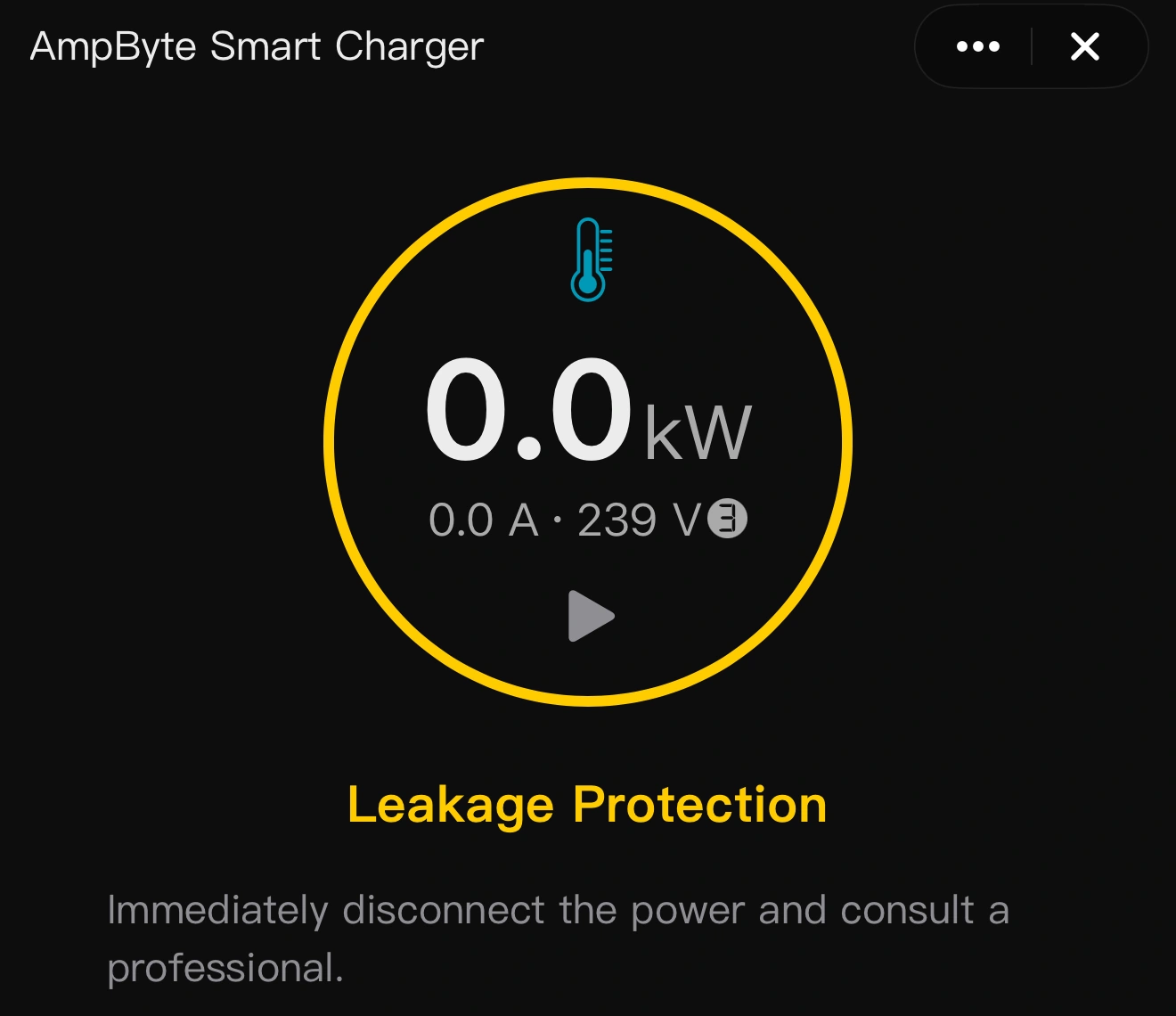
Leakage Protection
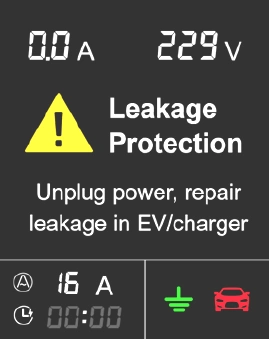
Leakage Protection charger alert screen
Charger screen · tap to enlarge
SmartApp Leakage Protection alert and explanation
SmartApp alert · tap to enlarge

Leakage detected

The residual-current protection has detected leakage in the charging circuit. Charging is stopped to reduce the risk of electric shock.

What to do

Stop the session and disconnect the supply when safe. Have the charger, cable and vehicle checked before charging again. Do not repeatedly reset a leakage warning.
02

PROTECTION / CONNECTION

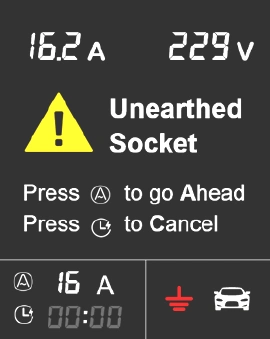
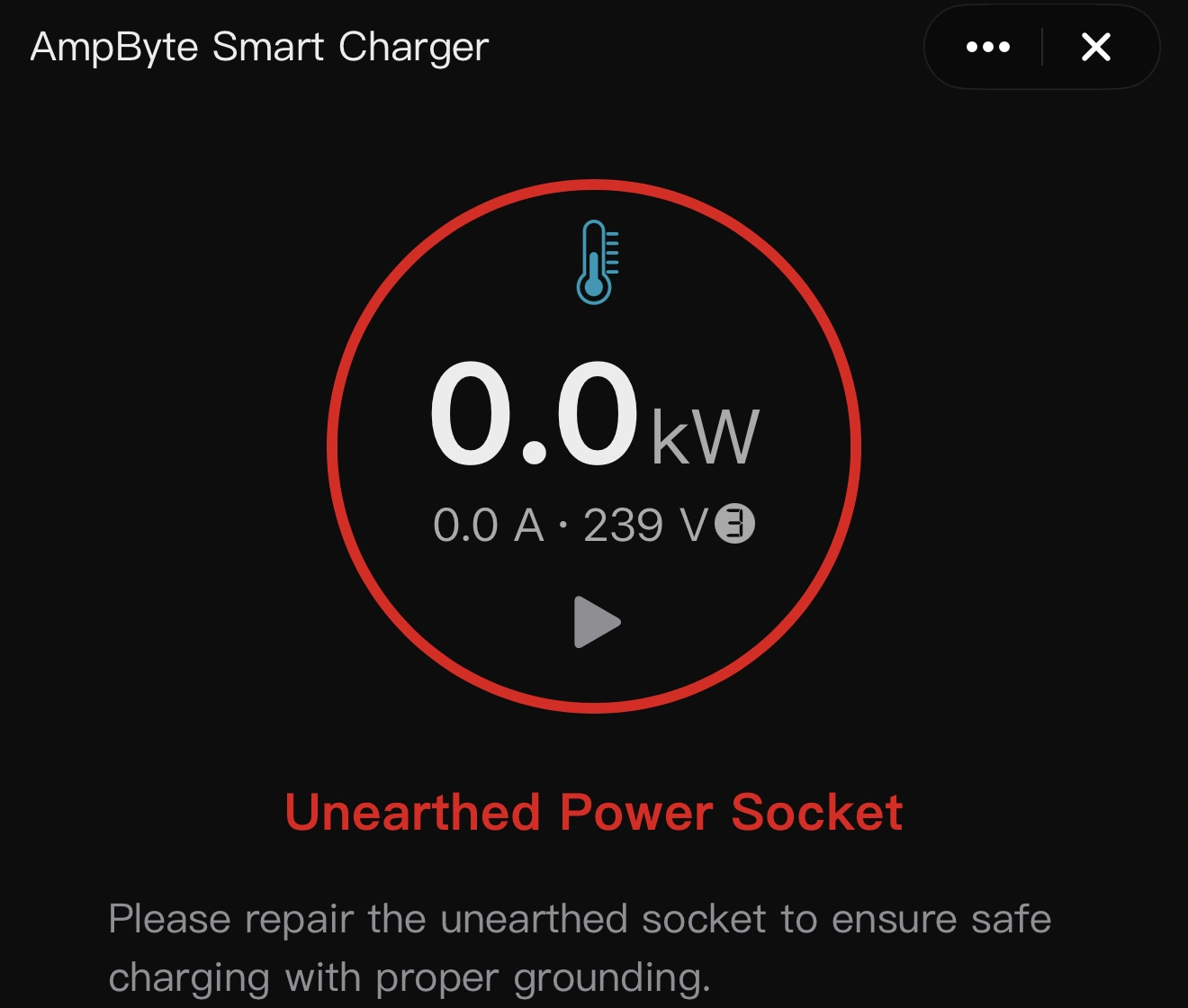
Unearthed Socket

Unearthed Socket charger alert screen
Charger screen · tap to enlarge
SmartApp Unearthed Socket alert and explanation
SmartApp alert · tap to enlarge

Grounding needs attention

The charger has detected a missing or unacceptable protective-earth connection at the power supply. The grounding indicator identifies the fault.

What to do

Stop charging and have a qualified electrician check the outlet and protective earth. Do not bypass the grounding warning or select an override to continue.

03

PROTECTION / CONNECTION

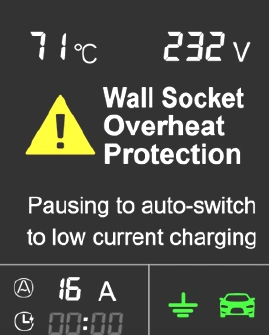
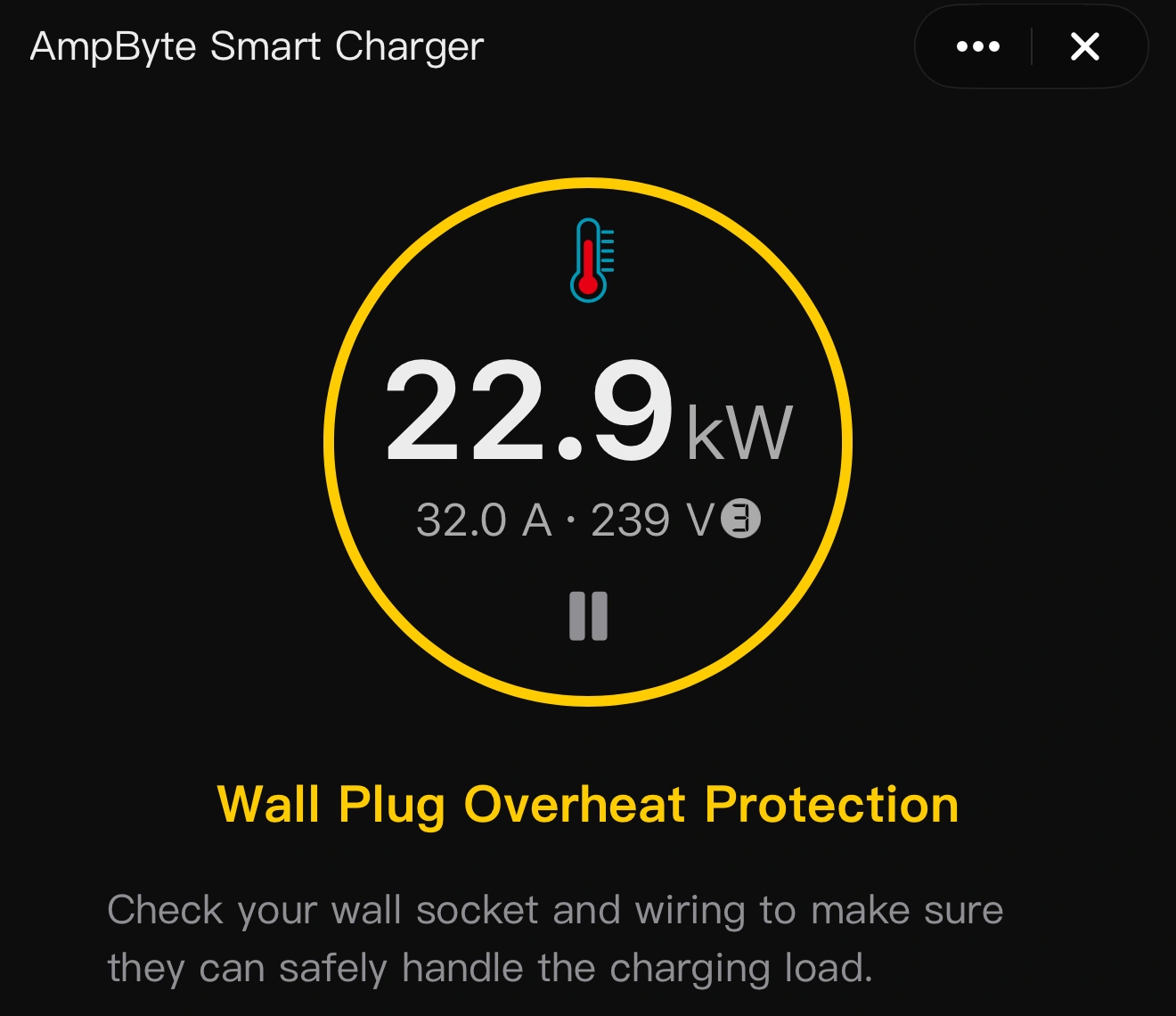
Wall Socket Overheat Protection

Wall Socket Overheat Protection charger alert screen
Charger screen · tap to enlarge
SmartApp Wall Socket Overheat Protection alert and explanation
SmartApp alert · tap to enlarge

Power plug too hot

On applicable domestic-plug models, charging pauses when the monitored plug temperature exceeds 70°C. The platform can resume at reduced current after cooling below 60°C.

What to do

Let the plug cool. Have the outlet, its current rating and the plug contact checked if the warning returns. Stop using a loose, damaged or discolored outlet.

04

PROTECTION / CONNECTION

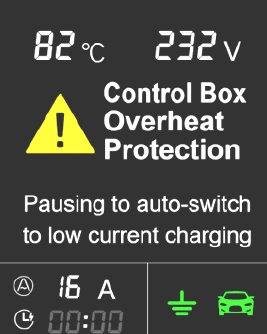
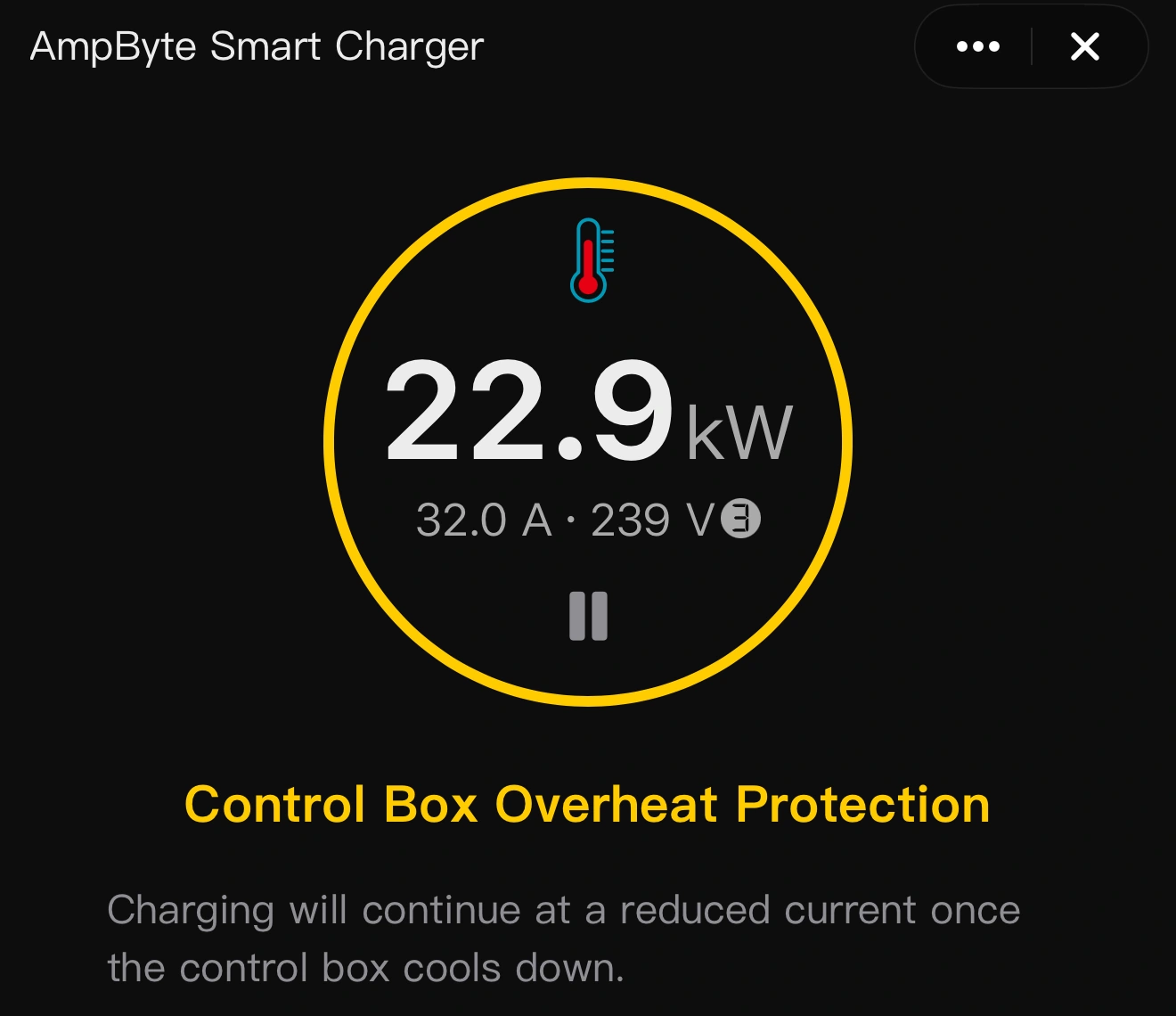
Control Box Overheat Protection

Control Box Overheat Protection charger alert screen
Charger screen · tap to enlarge
SmartApp Control Box Overheat Protection alert and explanation
SmartApp alert · tap to enlarge

Controller too hot

Charging stops when the control-box temperature reaches 80°C. The platform resumes at reduced current at 75°C and restores full power below 70°C.

What to do

Let the controller cool and keep it uncovered, away from external heat. If the warning repeats under normal conditions, stop using the charger and contact support.

05

PROTECTION / CONNECTION

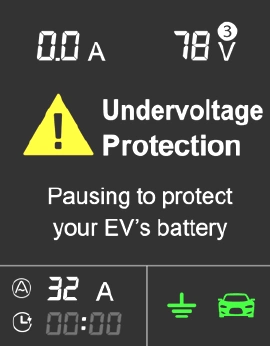
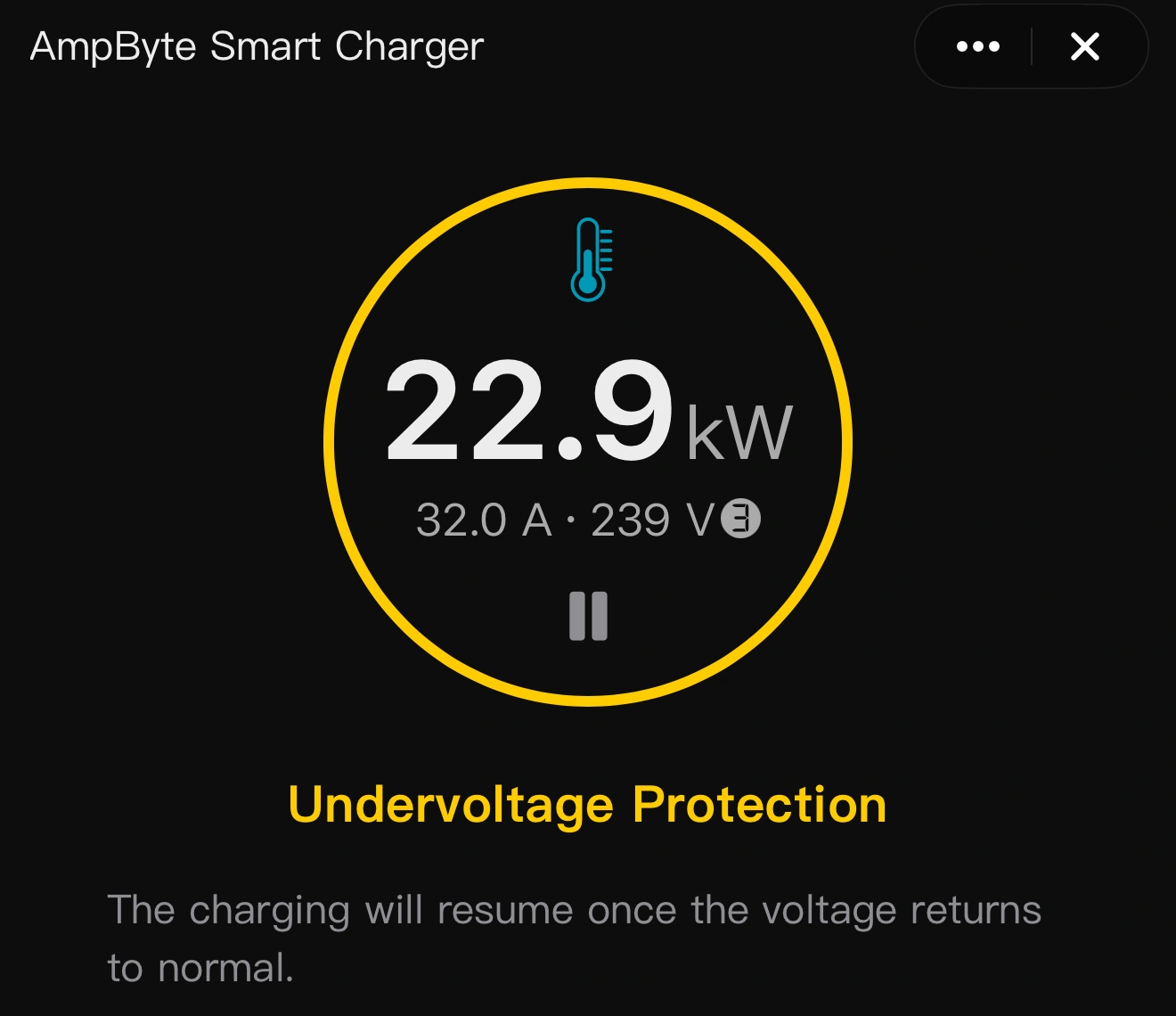
Undervoltage Protection

Undervoltage Protection charger alert screen
Charger screen · tap to enlarge
SmartApp Undervoltage Protection alert and explanation
SmartApp alert · tap to enlarge

Supply voltage too low

Charging pauses when the monitored supply voltage falls below 80 V. It resumes automatically when the voltage returns to the normal range.

What to do

Allow the supply to stabilize. If the warning persists or repeats, have a qualified electrician check the circuit and supply voltage.

06

PROTECTION / CONNECTION

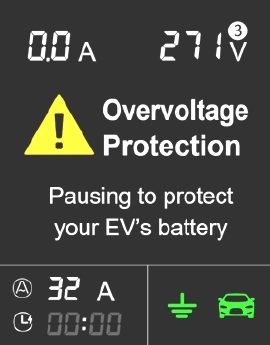
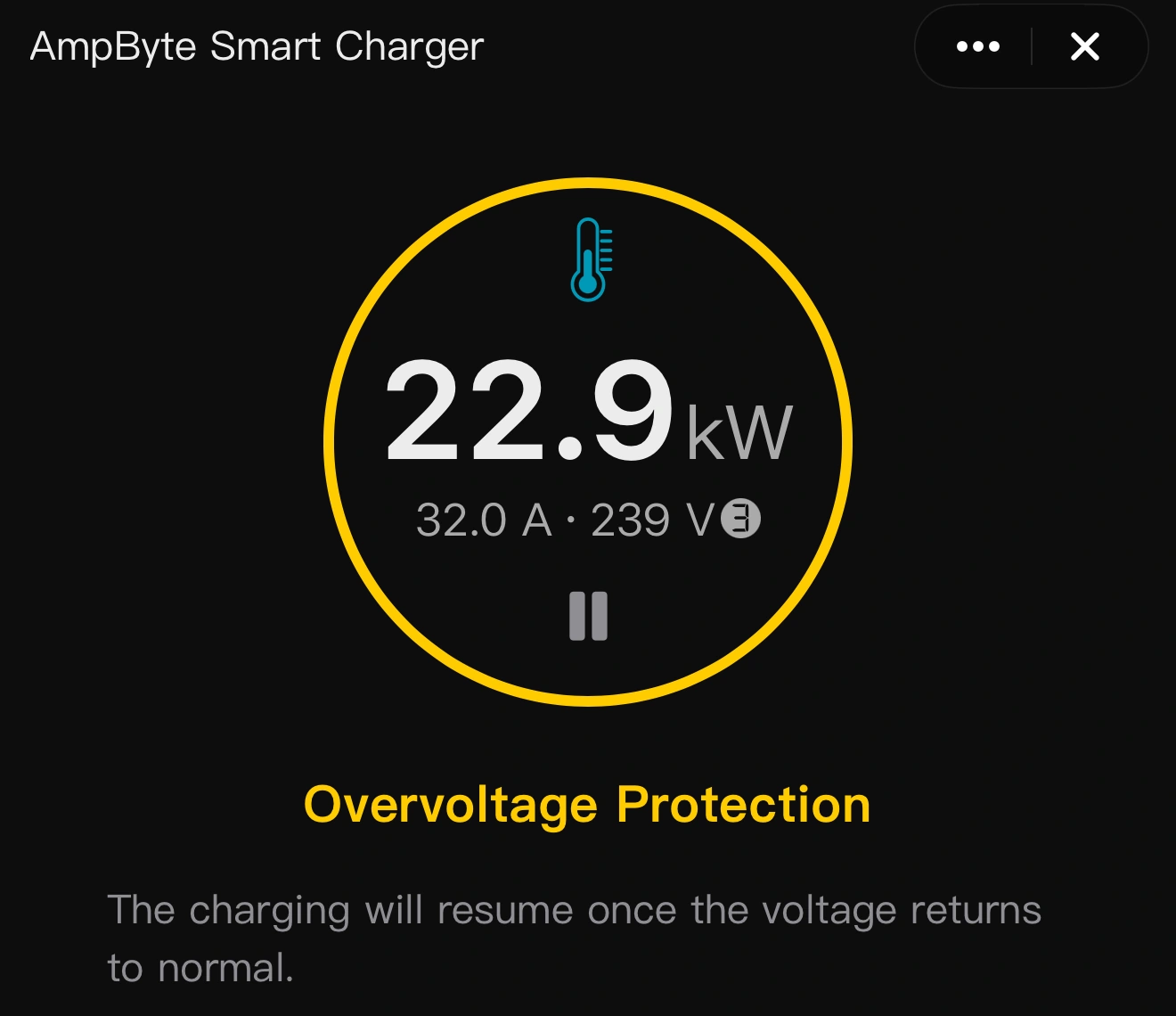
Overvoltage Protection

Overvoltage Protection charger alert screen
Charger screen · tap to enlarge
SmartApp Overvoltage Protection alert and explanation
SmartApp alert · tap to enlarge

Supply voltage too high

Charging pauses when the monitored supply voltage rises above 270 V. It resumes automatically after the voltage returns to the normal range.

What to do

If the warning persists, stop charging and have the supply checked by a qualified electrician. Do not try to override the voltage protection.

07

PROTECTION / CONNECTION

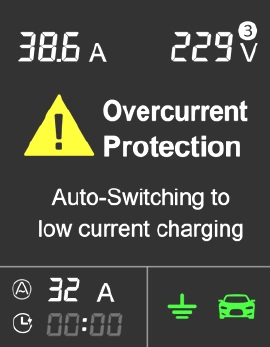
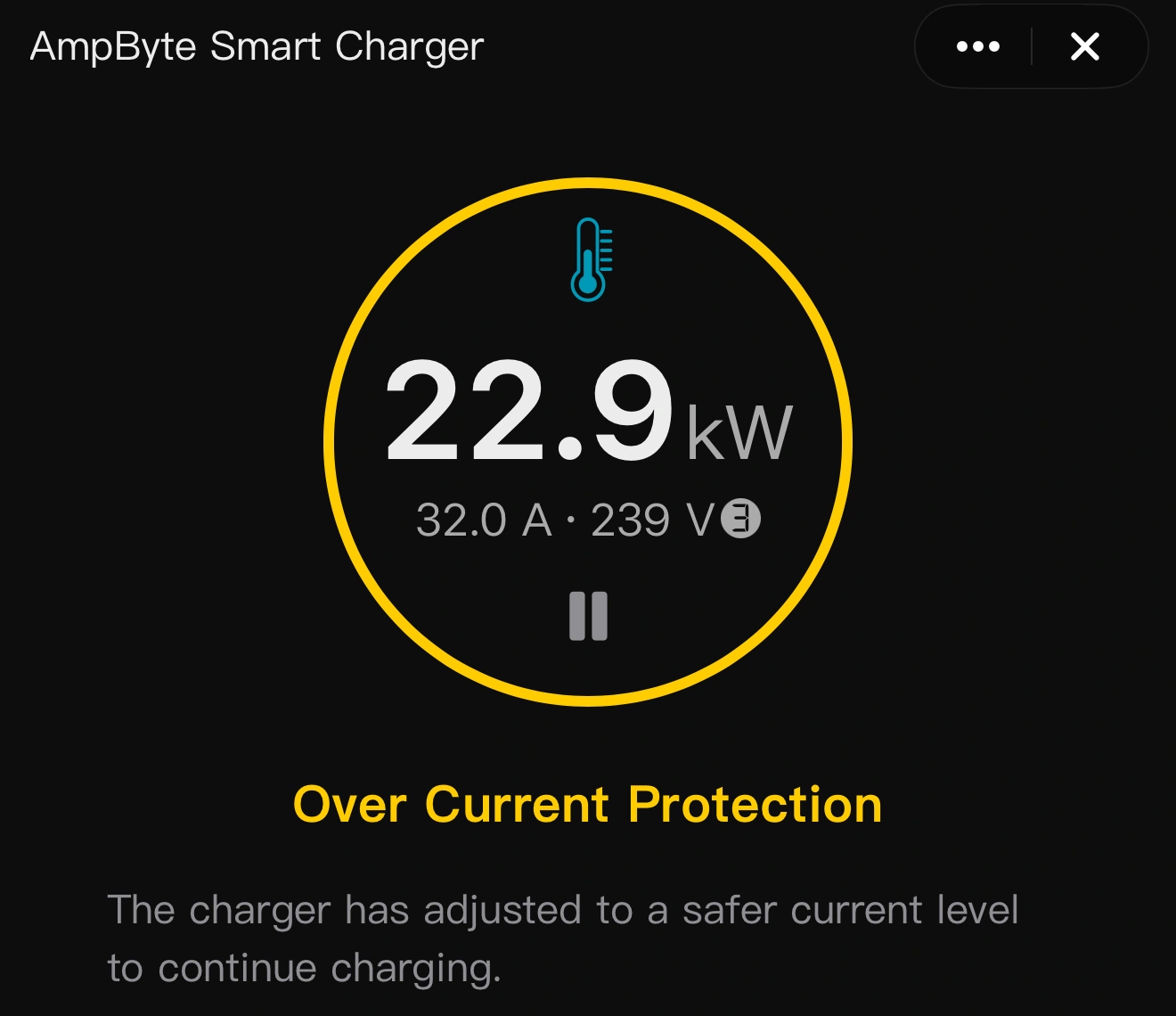
Overcurrent Protection

Overcurrent Protection charger alert screen
Charger screen · tap to enlarge
SmartApp Overcurrent Protection alert and explanation
SmartApp alert · tap to enlarge

Charging current above the limit

If current exceeds the set limit by the greater of 2 A or 20%, charging pauses for one minute before restarting at reduced current. A repeat overcurrent stops the session; the catalog specifies shutdown when the repeat lasts five seconds.

What to do

Stop charging if the fault returns. Have the charging setup checked before starting a new session. A power reset does not resolve the underlying cause.

08

PROTECTION / CONNECTION

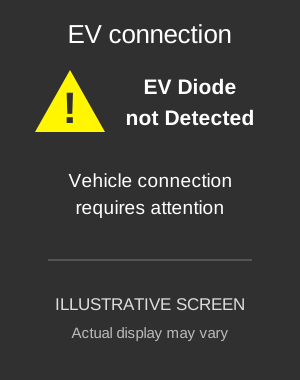
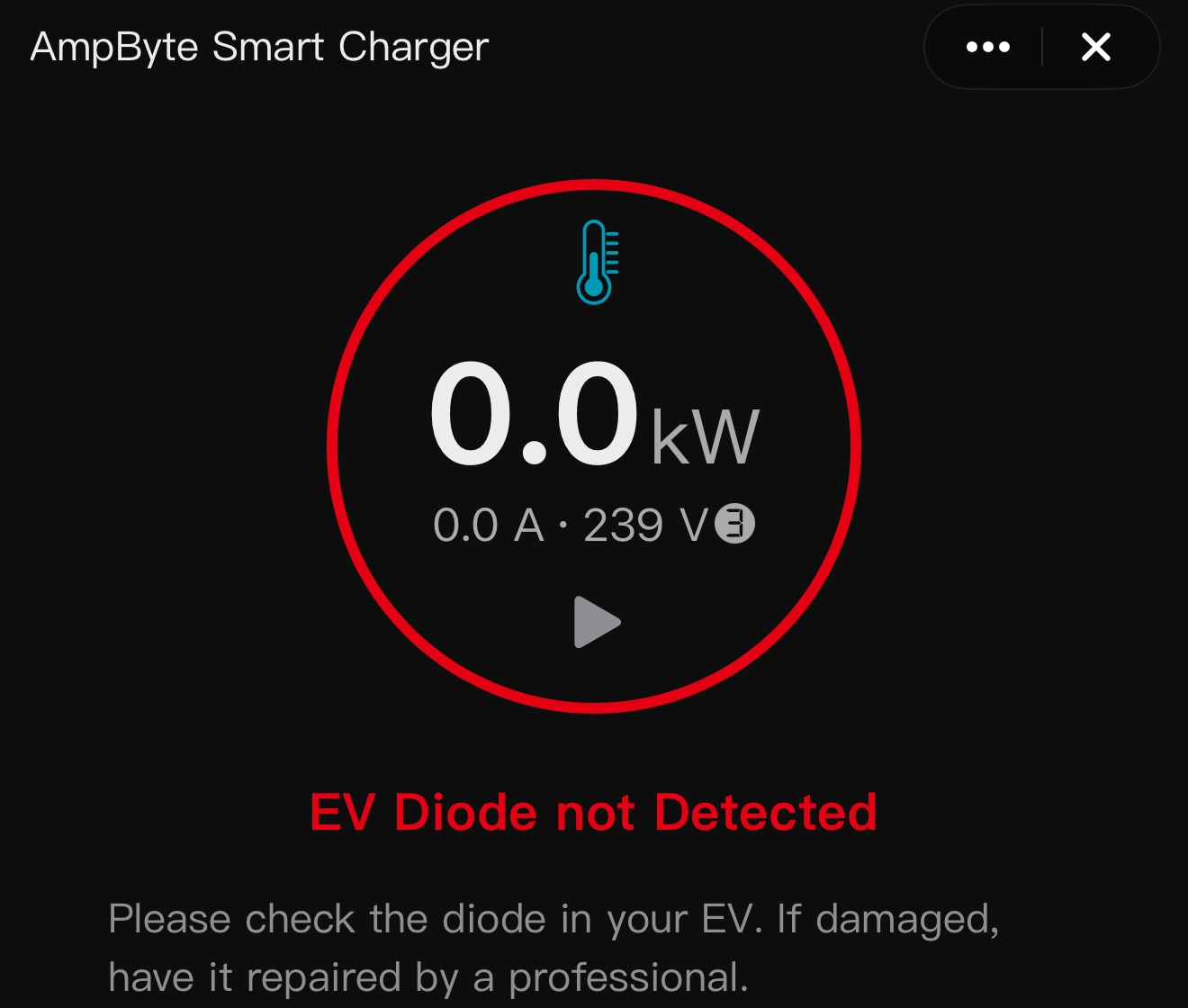
EV Diode not Detected

EV Diode not Detected illustrative screen
Illustrative screen · original screenshot unavailable
SmartApp EV Diode not Detected alert and explanation
SmartApp alert · tap to enlarge

Vehicle connection check failed

The charger has not detected the expected diode response from the vehicle’s charging interface. This indicates a problem with the vehicle connection or its signaling circuit.

What to do

Stop the session. Check that the connector is properly seated and inspect it for visible damage when disconnected. If the alert returns, contact vehicle service or charger support.

09

CRITICAL SYSTEM FAULT

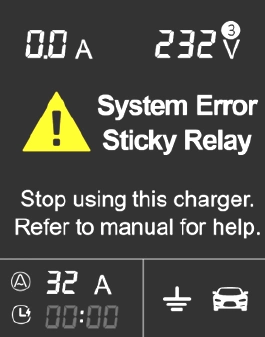
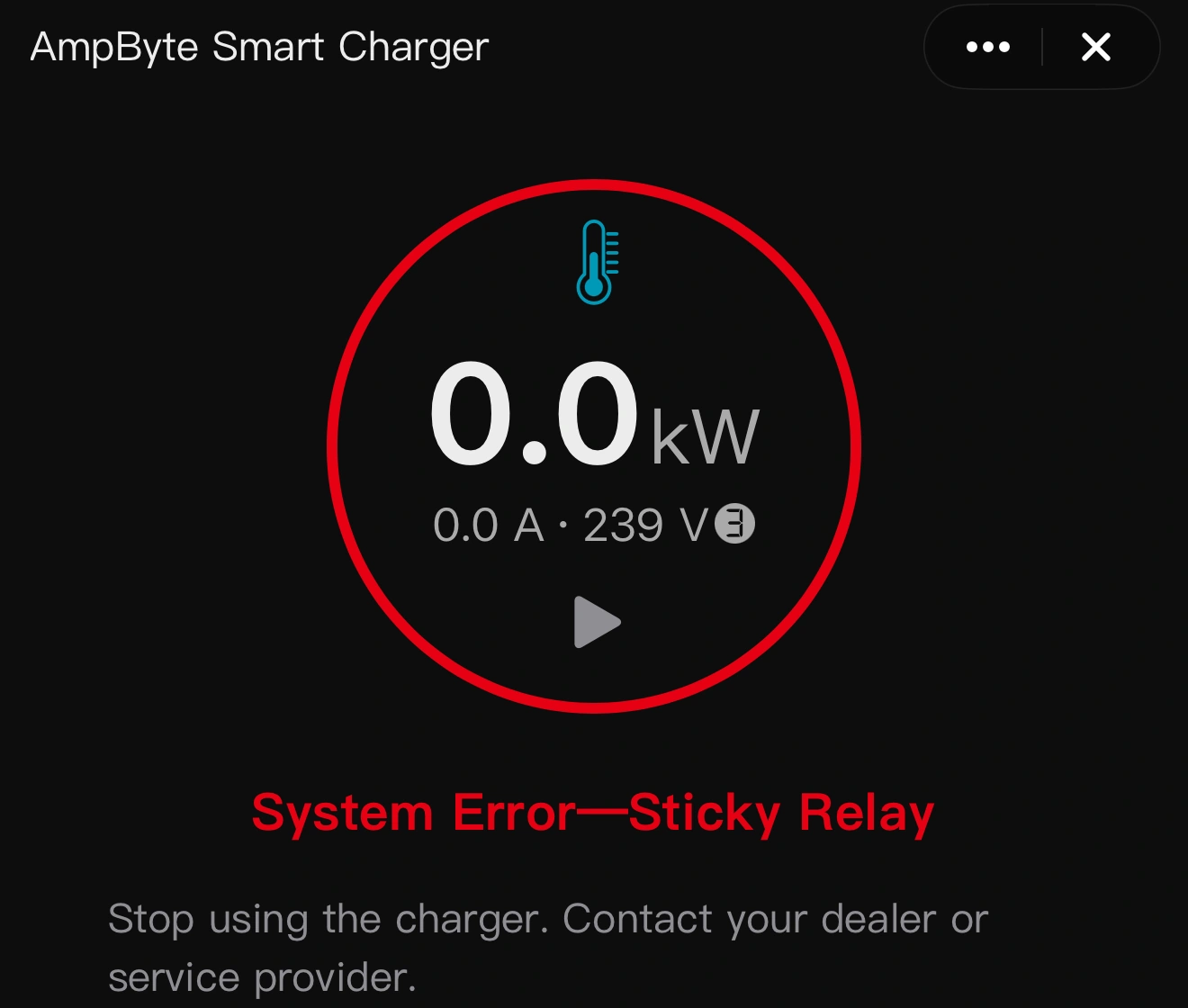
System Error — Sticky Relay

System Error — Sticky Relay charger alert screen
Charger screen · tap to enlarge
SmartApp System Error — Sticky Relay alert and explanation
SmartApp alert · tap to enlarge

Critical fault: switching relay

The self-check has detected a relay that may be stuck closed. The charger may no longer be able to disconnect power safely.

What to do

Stop using the charger immediately. Isolate the power supply safely and contact a qualified technician or support. Do not attempt another session or open the controller.

10

CRITICAL SYSTEM FAULT

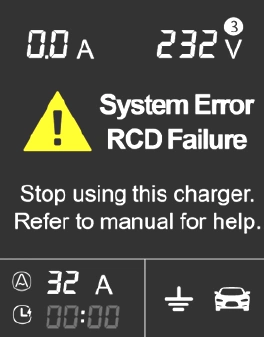
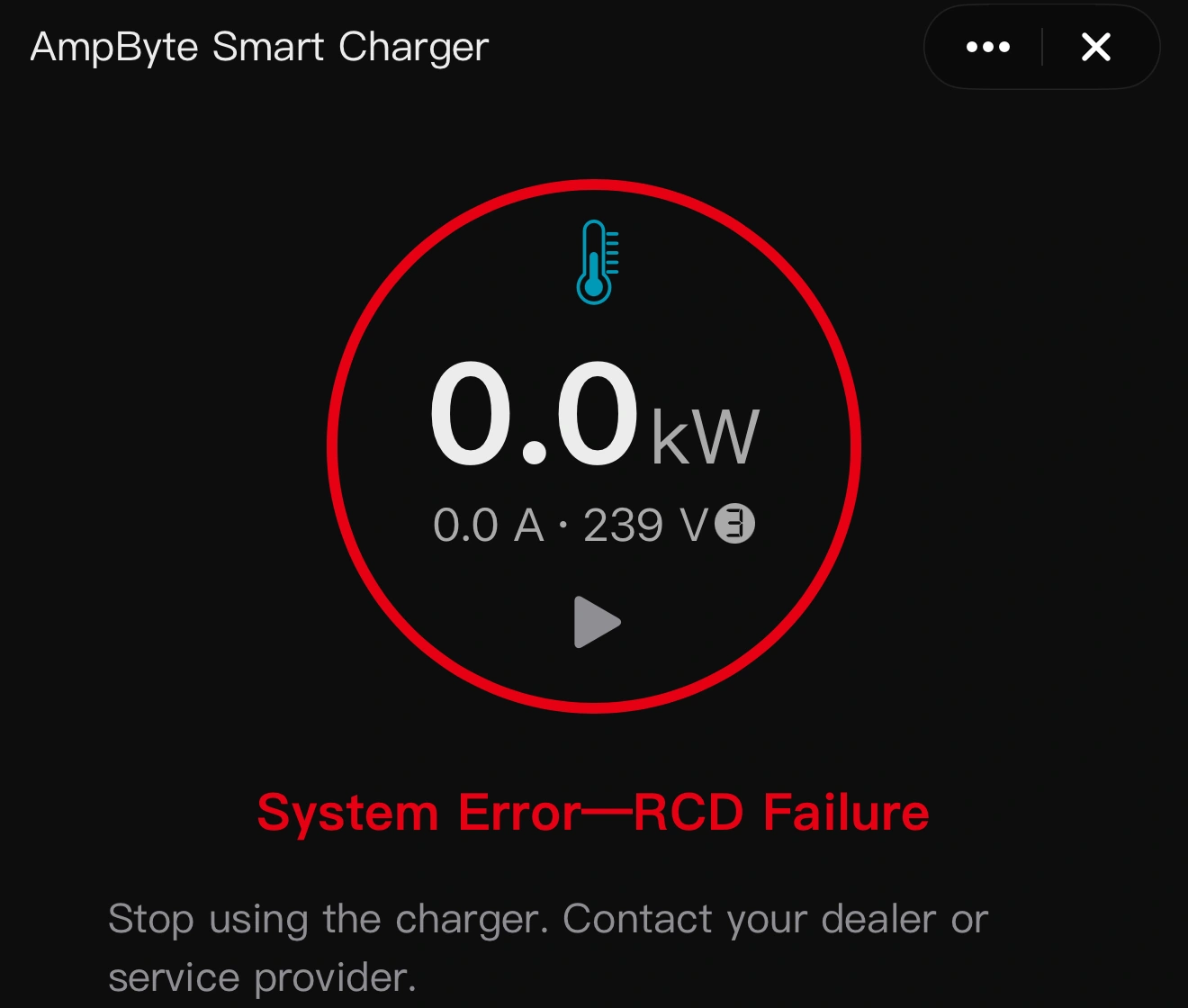
System Error — RCD Failure

System Error — RCD Failure charger alert screen
Charger screen · tap to enlarge
SmartApp System Error — RCD Failure alert and explanation
SmartApp alert · tap to enlarge

Critical fault: leakage protection

The residual-current protection has failed its self-check. The charger’s leakage-detection protection may be unavailable.

What to do

Stop using the charger immediately. Isolate the supply safely and arrange inspection by a qualified technician. Do not keep resetting or using the charger.

11

CRITICAL SYSTEM FAULT

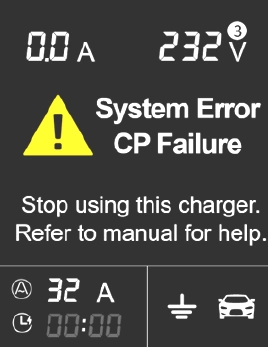
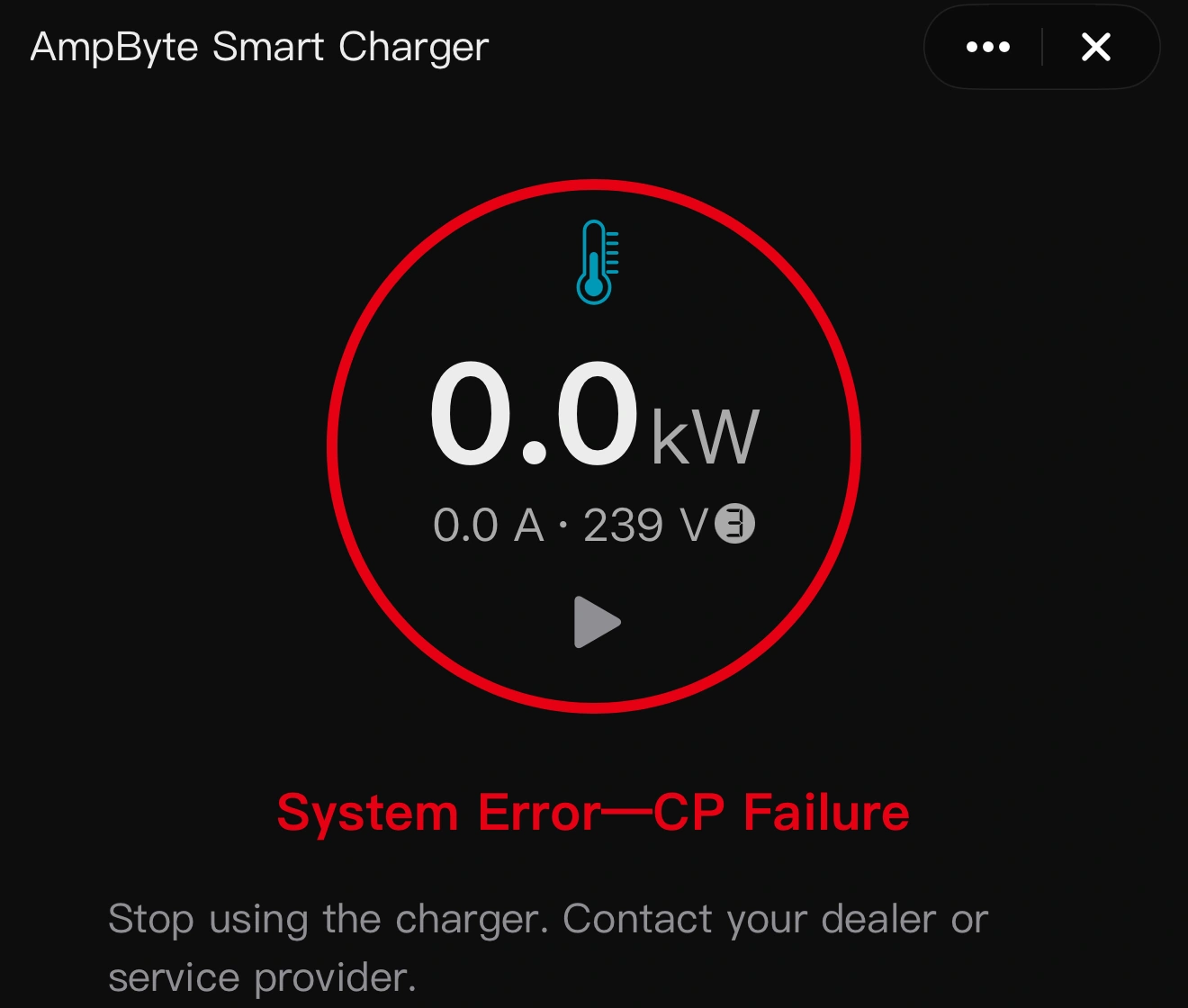
System Error — CP Failure

System Error — CP Failure charger alert screen
Charger screen · tap to enlarge
SmartApp System Error — CP Failure alert and explanation
SmartApp alert · tap to enlarge

Critical fault: control pilot

The control-pilot (CP) circuit has failed its self-check. This circuit exchanges charging readiness and current-limit signals with the vehicle. The charger may no longer be able to manage the charging connection correctly.

What to do

Stop using the charger immediately. Isolate the power supply safely and contact a qualified technician or support. Share the charger model and a photo of the alert. Do not attempt another session or open the controller; have the fault checked before further use.

12

SMARTAPP / HEALTH

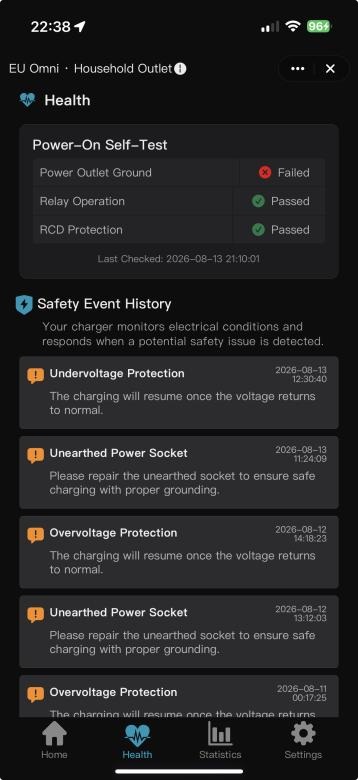
Self-test & Alert History

SmartApp Health showing the latest power-on self-test results and timestamped safety-event history
SmartApp Health · example records · tap to enlarge

Latest self-test

View the latest ground, relay and RCD checks, with results and check time.

Alert history

Review past alarms, their timestamps and explanations.

Open your charger in SmartApp and tap Health. Share relevant records with support.

Need help with an alert?

Email your charger model, the displayed message and a photo of the screen so we can help you identify the next step.

support@ampbyte.com ↗